SASSA Status Check 2026
Check your SRD R370 grant status online using your ID number and phone number.
Independent site — not affiliated with SASSA or the South African Government. Official site: srd.sassa.gov.za
Free · No registration on this site · Uses official SASSA status information
How Your SASSA SRD Status Check Works
Your SASSA status shows where your SRD grant application stands right now. You can check your SASSA status on srd.sassa.gov.za any time. But first, you need to understand how the system works. Many people get confused when their status changes. This section explains why.
What "Status" Actually Means
Your status is not a once-off result. SASSA reviews your application every single month. That means your SRD status for this month can be different from last month.
Did you get "Approved" in March? Good. But that does not mean you stay approved forever. SASSA checks your income and your circumstances again every month. Each month gets its own decision. So when you check your SASSA status, always look at the month you want to know about.
How Often SASSA Updates Your Status
SASSA reassesses you once a month, so your result belongs to that month. SASSA does not publish which day it lands. If you check early in the month and see "Pending", do not panic.
Delays happen. The system takes longer when many people apply. If your status has not changed yet, check again later in the same month. That is the only advice SASSA's own status guide gives.
Why Your Status Changes Every Month
SASSA looks at your bank account data every month. This is why your status can flip between "Approved" and "Declined". Here is how it works:
- If money coming into your account went above R628, SASSA declines you for that month.
- If you got a job, your status changes.
- If you started getting UIF, your status changes too.
- If your income drops below R628 again, SASSA can approve you again the next month.
So one declined month does not end your grant. Check your SRD status every month to stay updated.
How to Check Your SASSA Status Online and Offline
There are 7 ways to do a SASSA status check. All of them show the same result. Some need internet. Some do not. Pick the method that works best for you and your phone.
Use the SASSA Status Check Form on This Page
The fastest way to check SASSA status online is right here on this page. The tool helps you start a status check and points you to official SASSA status information. You can also use the official SRD portal directly if you prefer.
What You Need
You only need two things. First, your 13-digit South African ID number. Second, the phone number you used when you applied for the SRD grant. If you changed your number, use the old one first. It is the number SASSA has on file.
Step by Step
- Scroll to the status check tool at the top of this page.
- Type your 13-digit ID number in the first box. Check every digit.
- Type your phone number in the second box.
- Tap the check button.
- Wait a few seconds. Your result will show on the screen.
What Your Result Means
You will see one of three main results. Approved is SASSA's decision for that month, not the payment itself. Look at the pay day field next to it. If that field is empty, no payment has been processed yet. Pending means SASSA is still checking your details, and SASSA publishes no timeframe for it. Declined means SASSA rejected your application for that month. You can fight it. Lodge an appeal at srd.dsd.gov.za within 90 days of the rejection.
Official SASSA Portal Option
You can also check directly on the official SC19 portal. This method is useful if you want to enter your details on srd.sassa.gov.za yourself.
How to Open the SC19 Portal
Open any browser on your phone or computer. Chrome, Safari and Opera all work. Go to srd.sassa.gov.za/sc19/status. Type the address with care. Fake sites copy the real one to steal your details. The real site always starts with srd.sassa.gov.za.
Step by Step
- Open srd.sassa.gov.za/sc19/status in your browser.
- Enter your 13-digit ID number in the first field.
- Enter the cellphone number you used to apply.
- Tap the "Send Pin" button. SASSA sends an OTP to your phone by SMS.
- Type the OTP in the box on the screen.
- Your status will load. You will see a result for each month.
Common Errors on SC19
Sometimes the SC19 portal gives an error. Here is what to do:
- Page will not load: The site is busy. Try again after an hour. Early mornings are quieter.
- No OTP arrives: Wait five minutes. Check your signal. Then tap "Send Pin" again.
- "ID number not found": Check your ID number for typing mistakes. If it is correct, you may not have an active application.
- Wrong phone number: The number must match the one on your application. Update your details on srd.sassa.gov.za if your number changed.
If the errors carry on, use the tool on this page instead. Or try one of the other methods below.
Send a WhatsApp to 082 601 0111
SASSA has an official WhatsApp line. It is a chatbot, so it replies at any time of day. This method is cheap because WhatsApp uses very little data.
How to Start the WhatsApp Chat
Save the number 082 601 0111 in your contacts first. Name it something like "SASSA WhatsApp". WhatsApp cannot message a number that is not saved. Then open WhatsApp and start a new chat with that contact.
Exact Message to Send
Send the word "Hi" or "Status" to start. The SASSA bot will reply with a menu of options. Choose the option for SRD status. The bot will then ask for your details. Send your ID number when it asks. Send the phone number you used to apply. Answer each question one at a time. Wait for the bot to reply before you send the next message.
What the Reply Looks Like
The bot sends your status as a text message in the chat. It shows your name and your SRD result. You will see if you are approved, pending or declined for the month. If you are approved, the reply may also show your pay date. Take a screenshot of the reply. It helps to keep a record.
Dial the USSD Code *134*7737#
The USSD method is the best option if you have no data. It works like checking your airtime balance. Anyone with a SIM card can use it.
How to Dial on Any Phone
Open your phone's dialler. This is the screen where you type numbers to make a call. Dial *134*7737# and press the call button. A menu will pop up on your screen. This works on a smartphone or a basic phone. You do not need any apps.
Menu Steps
- Dial *134*7737# and press call.
- Read the menu that appears on your screen.
- Choose the option to check your SRD status. Type the number of that option and press send.
- Enter your 13-digit ID number when the menu asks for it.
- Follow the prompts until you see your result.
- SASSA may also send your status by SMS after the session ends.
If the session cuts off, dial the code again. USSD sessions time out fast. Have your ID number ready before you dial.
No Data or Airtime Needed
USSD does not use the internet. It works on the basic mobile network. You do not need data. You do not need airtime on most networks. Your phone just needs signal and a working SIM card. This makes USSD the best method for rural areas with weak internet.
Use the Moya App (also called Umoya App)
The Moya app is a free messaging app. Some people call it the Umoya app, but Moya is the correct name. It has a built-in SASSA section for SRD status checking.
How to Download the Moya App
Open the Google Play Store on your Android phone. Search for "Moya App". Tap install. The app is free to download. biNu (DataFree) made the app, and it works on all networks. The best part is that Moya is data-free. You can use it even when you have no data bundle.
How to Check SRD Status on Moya
- Open the Moya app on your phone.
- Tap the "Discovery" tab at the bottom of the screen.
- Find and tap the SASSA SRD option.
- Enter your 13-digit ID number.
- Enter the phone number you used to apply.
- Your SRD status will show inside the app.
Moya App vs SC19 Portal
Both give the same result. So which should you use? Here is a quick guide:
| Situation | Best Choice |
|---|---|
| You have no data | Moya app (data-free) |
| You use a computer | SC19 portal |
| You want to see all months at once | SC19 portal |
| The SC19 site is down or slow | Moya app |
| You have an iPhone | SC19 portal |
Use Moya when data is the problem. Use SC19 when you want the full month-by-month view.
Call the Toll-Free Line 0800 60 10 11
You can phone SASSA and ask an agent to check for you. The call is free from any South African number. This is a good option if you struggle with apps and websites. It also helps when your status is confusing and you need a person to explain it.
What to Say When They Answer
Tell the agent you want to check your SRD grant status. Say it simply: "I want to check my R370 SRD status, please." The agent will ask for your ID number. Have it ready before you call. They may also ask for the phone number you used to apply. They might ask a security question to confirm it is you. Answer honestly. The agent will then read your status to you. Ask them to explain anything you do not understand.
Best Times to Call
The call centre gets very busy. Avoid Monday mornings. That is the worst time. Everyone calls after the weekend and waiting times are long. Also avoid the days right after payment dates. The best time to call is Tuesday to Thursday, between 9am and 3pm. Calls go through faster then. Be patient. You may still wait in a queue for a while.
Visit a SASSA Office
You can also check your status in person. This is the slowest method. But it is useful when you have a bigger problem. Go in person if your status is stuck, your details are wrong, or your identity was stolen. A staff member can look at your full record and help you fix it.
What to Bring
- Your green ID book or smart ID card. This is a must.
- The phone number you used to apply. Bring the phone if you can.
- Any SMS messages from SASSA about your grant.
- Proof of your bank account, if your problem is about payments.
Arrive early in the morning. Queues at SASSA offices grow fast. Some people arrive before the office opens.
How to Find Your Nearest Office
Go to sassa.gov.za and search for the office locator. It lists offices by province. Pick your area and note the address and hours. You can also call 0800 60 10 11 and ask for your nearest office. The agent will give you the address for free.
Whichever method you pick, your result is the same. Check once a month after you apply. If your status says declined, do not panic. Lodge an appeal at srd.dsd.gov.za within 90 days of the rejection.
SASSA Status Check Using ID Number and Phone Number
You can do an SRD status check using ID number in a few minutes. It works on the official website at srd.sassa.gov.za. This is the same method for the R370 status check using ID number. The old R350 status check worked the same way. You only need two things before you start.
What You Need: Your ID Number and Phone Number
Get these two things ready:
- Your 13-digit South African ID number. Type it with no spaces.
- The cellphone number you used when you applied for SRD.
You need both. The system will not work with just one. If you enter your ID number without the right phone number, you will not see your status. Make sure both match your original application.
My ID Number Is Not Found: What to Do
Sometimes the system says your ID number is not found. Do not panic. Try these steps:
- Check all 13 digits again. Look for typing mistakes. Remove any spaces or dashes.
- Make sure it is the same ID number you used when you applied.
- If the number is correct, the system may be busy. Many people check sassa status at month end. Wait a few hours and try again.
- Still not found? Call SASSA on 0800 60 10 11. The call is free. Ask them to check your details.
Why SASSA Needs Both ID Number and Phone Number
SASSA asks for both details to keep your grant safe. Here is why:
- Security. It stops other people from checking your private status. Your ID number alone is not enough proof.
- Identity check. Your phone number confirms it is really you doing the check.
- Exact match. The number must match what is on your SRD application. Even one wrong digit will block you.
Did you change your number after you applied? Then update it with SASSA first. Go to srd.sassa.gov.za and use the contact details update option. After that, your sassa status check online will work again.
Official SASSA Status Check Portal: srd.sassa.gov.za/sc19/status
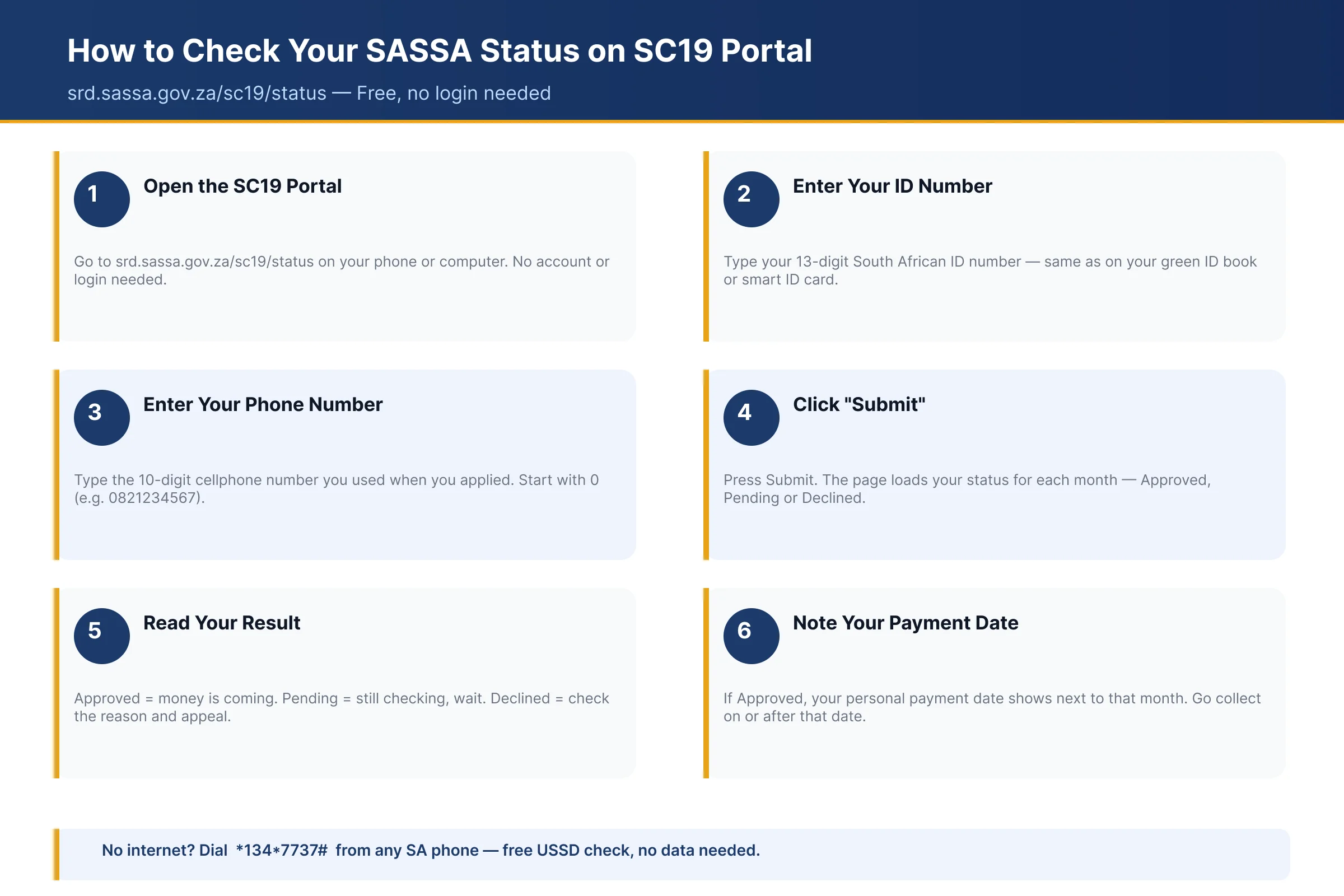
The SC19 portal is the fastest way to check your SASSA SRD R370 status online. You only need your ID number and phone number. This section shows you how to use it step by step. It also covers the most common problems and how to fix them.
What Is the SC19 Portal?
srd.sassa.gov.za is the official SASSA website for the SRD grant. SC19 is the status check page on that site. The full link is srd.sassa.gov.za/sc19/status. The South African government runs this page. It is free to use and safe. Do not trust other websites that ask for your banking PIN or a fee. SASSA never charges you to check your status. Always type the address yourself or use the link above.
How to Login to srd.sassa.gov.za
The srd sassa gov za login is simple. You do not need a username. Your ID number and cellphone number are your login details. The site sends a one-time PIN (OTP) to your phone to confirm it is you.
First-Time Login Steps
- Open your browser and go to srd.sassa.gov.za.
- Scroll down to the section for the R370 grant.
- Click on the option you need, like status check or banking details.
- Type your 13-digit South African ID number.
- Type the cellphone number you used when you applied.
- Click the button to send the OTP.
- Wait for the SMS with your PIN. It usually arrives within a minute.
- Enter the PIN on the site and continue.
OTP Not Received: What to Do
Sometimes the OTP does not arrive. Try these fixes:
- Wait two to three minutes. The network can be slow.
- Check that your phone has signal.
- Make sure your SMS inbox is not full. Delete old messages.
- Click "Resend OTP" on the site. Do this only once. Clicking many times can block new PINs for a while.
- Check you typed the right phone number. It must match the number SASSA has for you.
- If you lost that SIM card, you must update your phone number with SASSA first. Use the contact details update option on the website.
Forgot Your Password
Good news. The SRD portal does not use a normal password. Every login uses a fresh OTP sent by SMS. So there is no password to forget. If you cannot get in, the problem is almost always the phone number. Make sure you still use the number you registered with. If not, update it on srd.sassa.gov.za under "change contact details". You will need your ID number to do this.
SC19 Status Check: Full Step-by-Step Guide
Follow these steps to check your status on the SC19 page:
- Open the page. Go to srd.sassa.gov.za/sc19/status. You will see a form with two boxes.
- Enter your ID number. Type all 13 digits with no spaces.
- Enter your phone number. Use the number from your SRD application.
- Click the check button. The page will load your results. This can take a few seconds.
- Read your results. You will see a list of months. Next to each month is your status. It may say Approved, Pending, or Declined.
- Check payment dates. If a month says Approved, look for a pay date next to it. If there is no date yet, SASSA has not set one. Check again in a few days.
- Note any decline reasons. If a month says Declined, the page shows the reason. Common reasons include "alternative income source identified" or "UIF registered". You can lodge an appeal at srd.dsd.gov.za within 90 days of the rejection.
Check your status once a week. Statuses change as SASSA runs its monthly checks.
SC19 Portal Not Working: All Fixes
The SC19 page gets very busy, especially on payment days. Here are fixes for the common problems.
Server Error or Site Is Down
If you see a server error, the site is overloaded. Do not keep refreshing. Wait an hour and try again. Early morning and late night are quieter times. You can also skip the website:
- WhatsApp: Send a message to 082 601 0111 and follow the prompts.
- USSD: Dial *134*7737# on your phone and choose the status option.
Both options give you the same status result.
"ID Not Found" on SC19
This message means the system cannot match your details. Common causes:
- You typed your ID number wrong. Check every digit.
- You used a different phone number from the one on your application.
- You never finished your application. Apply again on srd.sassa.gov.za.
Fix the details and try again. If it still fails, call SASSA on 0800 60 10 11.
Page Won't Load or Keeps Spinning
- Clear your browser cache and cookies, then reload the page.
- Try a different browser, like Chrome instead of the phone's built-in browser.
- Open the page in incognito or private mode.
- Switch between WiFi and mobile data. Sometimes one works better.
- Restart your phone and try once more.
If nothing works, use USSD or WhatsApp instead. Your status is the same on every channel.
SASSA USSD Status Check Code
You do not need internet to check your SASSA status. There is a free USSD code for that. It works on any phone, even an old Nokia. This is the easiest SASSA status check USSD option. No data. No app. No smartphone.
How to Use *134*7737# Step by Step
The main USSD code SASSA status option is *134*7737#. Here is how to use it:
- Open your phone's dial pad. This is where you type phone numbers.
- Dial *134*7737# and press the call button.
- A menu pops up on your screen. It welcomes you to the SASSA SRD service.
- Type in your 13-digit South African ID number. Press reply or send.
- Enter the cellphone number you used when you applied. Press send.
- Wait a few seconds. Your grant status shows on the screen.
You may also get an SMS with your status. Write it down before the screen closes. The whole process takes less than two minutes. You can check as many times as you want. It costs nothing.
Other Useful SASSA USSD Codes
There are more codes worth saving on your phone. Each one does a different job:
| Code | What It Does |
|---|---|
| *134*7737# | Check your SRD R370 grant status |
| *120*3210# | Check your Postbank card balance |
| *120*69277# | Check SASSA grant payments and balance |
The Postbank code *120*3210# is handy on payday. Use it before you go to the shop or ATM. That way you know your money has arrived. It saves you a wasted trip.
USSD Not Working? What to Do
Sometimes the code fails or the screen freezes. Do not panic. Try these fixes:
- Check your airtime. The service is free, but some networks block USSD when you have R0. Load a small amount and try again.
- Check your signal. Weak signal breaks USSD sessions. Move to a spot with better reception.
- Wait and retry. The system gets busy around payment dates. Try again after an hour.
Still stuck? Use WhatsApp instead. Send "Status" to 082 601 0111. Or call the SASSA helpline on 0800 60 10 11. The call is free from any phone. You can also check sassa status without internet at your nearest SASSA office.
SASSA Status Check on WhatsApp
You can check your SASSA status on WhatsApp in a few minutes. It works on any phone with WhatsApp. You do not need to visit a SASSA office or stand in a queue.
SASSA WhatsApp Number: 082 601 0111
The official SASSA WhatsApp number is 082 601 0111. Save it to your contacts first. WhatsApp only shows numbers that are saved on your phone.
Messages on this line are free. WhatsApp uses data, so connect to Wi-Fi if you can. Watch out for fake numbers. SASSA only uses 082 601 0111 on WhatsApp.
How to Check Your Status on WhatsApp: Step by Step
- Save 082 601 0111 to your contacts. Name it "SASSA".
- Open WhatsApp and find the SASSA contact.
- Send the word "Status" as a message.
- SASSA replies with a menu. Reply with the number for SRD grant status.
- Type your ID number when SASSA asks for it.
- Type the phone number you used when you applied.
- SASSA sends back your status. It will say approved, pending, or declined.
If SASSA does not reply right away, wait a few minutes. The line gets busy at month end.
WhatsApp vs USSD: Which Should You Use?
WhatsApp needs internet. USSD does not. To use USSD, dial *134*7737# on any phone. It works even on old phones with no data.
Both methods give you the same status result. So pick the one that suits you.
- Have Wi-Fi or data? Use WhatsApp. It is easier to read and follow.
- No data or airtime for internet? Dial *134*7737# instead.
You can also check online at srd.sassa.gov.za if you prefer a website.
Moya App / Umoya App: SASSA Status Check
Not everyone has airtime or data to spare. The Moya App solves that problem. You can check your SASSA SRD status without spending a cent on data.
What Is the Moya App?
Moya is a free messaging and services app made by biNu (DataFree). It is zero-rated, which means you use it without spending data. No airtime. No data bundle. Nothing.
Many people call it the "Umoya app". It is the same app. Do not get confused if you hear both names.
The app works on Android phones. You download it from the Google Play Store. Inside, there is a built-in SASSA section where you check your R370 SRD grant status.
How to Download and Set Up Moya
- Open the Google Play Store on your Android phone.
- Type "Moya App" in the search bar.
- Tap Install and wait for the download to finish.
- Open the app once it is installed.
- Enter your cellphone number when it asks.
- Wait for the OTP code by SMS and type it in.
- Accept the terms and let the app finish setting up.
Setup takes about two minutes on a decent connection.
How to Check SRD Status on the Moya App
- Open the Moya App on your phone.
- Look for the Discover or Services tab at the bottom.
- Tap the SASSA icon or search "SASSA" inside the app.
- Choose "SRD Grant Status Check".
- Type your 13-digit ID number.
- Type the cellphone number you used on your SRD application.
- Tap Submit.
Your result shows on the screen in a few seconds. You will see Approved, Pending, Declined or Cancelled. If approved, it also shows the month and your payment date.
Moya App Not Working: Fixes
- App not loading: Check your phone storage. Close the app fully and open it again.
- SASSA section missing: Go to Play Store and update Moya to the latest version.
- Wrong result showing: Your status may have just changed. Check again tomorrow.
- Still stuck? Use WhatsApp on 082 601 0111 or dial *134*7737# instead.
SASSA Status Meanings Explained: Approved, Pending, Declined and More
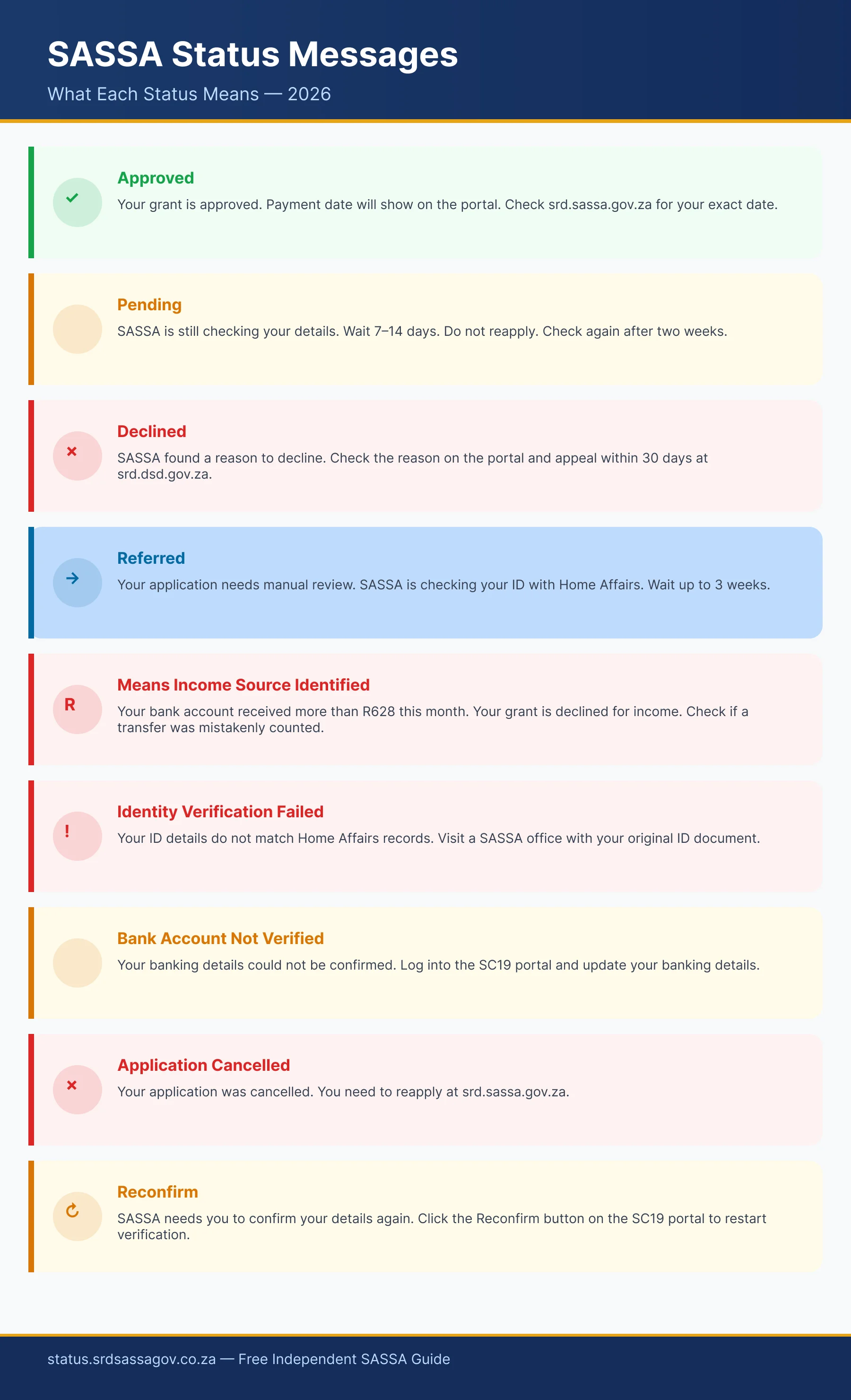
SASSA uses short status words when you check your R370 grant. Many people see these words and do not know what they mean. Some statuses are good news. Others need action from you right away. Here is what every single status means and exactly what you should do next.
| Status | What It Means | What to Do Now |
|---|---|---|
| Approved | SASSA said yes for that month. It is the decision, not the payment | Read the pay day field. Empty means no payment processed yet |
| Approved, No Pay Date | Approved, but SASSA has not processed a payment yet | Check your banking details and watch the pay day field |
| Pending | SASSA is still checking your application | Wait and check again later in the month |
| Declined | SASSA rejected you for that month | Appeal at srd.dsd.gov.za within 90 days, for each declined month |
| Cancelled | Your application was stopped | Reinstate it on srd.sassa.gov.za |
| Failed | Your ID or details did not match Home Affairs | Fix your details and contact SASSA |
| Banking Details Pending | SASSA is still checking your bank account | Wait, or submit bank details if you have not |
| Application Submitted | SASSA got your application | Nothing yet. Check again next week |
| Application Assessed | Checks are done, decision is coming | Wait for approved or declined |
| Documents Outstanding | SASSA needs papers from you | Upload the documents fast |
| Reapplication Pending | Your new application is being checked | Wait and check weekly |
| Income Source Identified / Undefined | Money was found in your bank account | Appeal if the money was not income |
| Gov_Payrol_Registered | SASSA thinks you work for government | Appeal with proof if this is wrong |
| Referred SAFPS | Your ID is flagged for possible fraud | Contact SAFPS to clear your name |
| Not Submitted | Your application never went through | Apply again on srd.sassa.gov.za |
| Under Review | SASSA is rechecking your details | Wait, then appeal if declined |
Approved
Good news. Approved means SASSA accepted your application for that month. You passed all the checks. That is the decision, not the payment. Look under the status for the pay day field. SASSA's own status guide says it straight: if no pay day value is provided, no payment has been processed as yet. Check again later in the month. Also check that your banking details show as verified. If your bank details are missing or wrong, the money cannot reach you. Fix them on srd.sassa.gov.za right away. Approved for one month does not mean approved for every month. Check every month.
Pending
Pending means SASSA is still busy with your application. They check your details with Home Affairs, banks, SARS and UIF. This is normal. SASSA does not publish how long pending lasts, so ignore any fixed number of days you read elsewhere. You do not need to do anything yet. Do not apply again. A second application can cause delays. Check your status again later in the month on srd.sassa.gov.za. If it is still pending after the next payment cycle, call SASSA on 0800 60 10 11. Ask them to check what is holding up your application.
Declined
Declined means SASSA rejected your application for that month. The reason shows next to the status. Common reasons include income found in your account, UIF registration, or another grant in your name. Do not give up. The appeal goes to the Independent Tribunal (ITSAA) at srd.dsd.gov.za, and the site says to lodge it within 90 days of the rejection. You must do this for each declined month separately, because one appeal covers one month only. The tribunal aims to decide within 60 to 90 days of receiving your appeal.
Cancelled
Cancelled means your application was stopped. Either you cancelled it yourself, or someone else did it with your details. If you did not cancel, act fast. Someone may be misusing your ID. Go to srd.sassa.gov.za and click the option to reinstate your grant. Follow the steps with your ID number and phone number. Your grant should become active again. Payments only start again from the month you reinstate. You do not get back pay for cancelled months. If you cannot reinstate online, call SASSA on 0800 60 10 11.
Failed
Failed means your personal details did not match the records at Home Affairs. Your name, surname or ID number may be spelled wrong. Or your ID may be flagged at Home Affairs. First, check your application details on srd.sassa.gov.za. Fix any spelling mistakes. If your details look right, the problem sits with Home Affairs. Visit your nearest Home Affairs office and ask them to check your ID status. Once Home Affairs fixes the record, contact SASSA and ask them to run your application again.
Banking Details Pending
This status means SASSA is still checking your bank account. The account must be in your name. SASSA checks this with your bank and does not publish how long that check takes. If you never submitted bank details, do it now. Go to srd.sassa.gov.za, find your ID, and click the banking details link. SASSA sends the secure link by SMS to your registered number. Use your own account only. Never use a friend or family member's account. SASSA will reject it and your payment will not go through.
Application Submitted
This is the first status you see. It means SASSA received your application. Nothing has been checked yet. Your application is in the queue. You do not need to do anything. Keep your phone on, because SASSA may send an SMS. Check your status again after a week on srd.sassa.gov.za. The status should change to pending, then to a decision. If it stays on submitted for more than a month, call SASSA on 0800 60 10 11 and ask why nothing has moved.
Application Assessed
Assessed means SASSA finished checking your details. They checked your income, your ID, and other government records. Now the system is making the final decision. You are close to an answer. There is nothing for you to do. Wait a few days and check again. Your status will change to approved or declined. If it changes to approved, look for your pay date. If it changes to declined, read the reason and lodge an appeal at srd.dsd.gov.za within 90 days of the rejection. Check your status every few days during this stage.
Documents Outstanding
SASSA needs papers from you before it can decide. This often happens when your details do not match government records. SASSA may want a copy of your ID, proof of your bank account, or an affidavit. Check your SMS messages for instructions. Also log in on srd.sassa.gov.za and look for an upload option. Send the documents as soon as you can. Your application stays stuck until SASSA gets them. If you are not sure which documents they want, call 0800 60 10 11 and ask.
Reapplication Pending
You applied before, and now you applied again. Reapplication pending means SASSA is checking your new application. This works the same as a normal pending status. SASSA runs all the checks again with Home Affairs, banks and SARS. You do not need to do anything. Do not submit another application. Check your status once a week. Most reapplications get an answer within a few weeks. If it stays pending for more than two months, call SASSA and ask them to look into it.
Income Source Identified / Undefined
SASSA found money in your bank account above R628 for that month. The system reads this as income, so it declined you. But the money may not be real income. It could be a loan, a gift, or money you held for someone else. If that is true, appeal it. Go to srd.dsd.gov.za and lodge within 90 days of the rejection. Explain where the money came from. Keep proof, like a loan agreement or an affidavit. Do this for each month this status appears. Many people win these cases.
Gov_Payrol_Registered
This status means the system found your ID on a government payroll. SASSA thinks you work for the state, so you do not qualify. Sometimes this is a mistake. Your contract may have ended long ago. Or someone may be using your ID at a government job. If you do not work for government, lodge an appeal at srd.dsd.gov.za within 90 days of the rejection. Get proof, like a letter from your old employer showing your end date. If you suspect ID fraud, report it to Home Affairs and the police.
Referred SAFPS
SAFPS is the Southern African Fraud Prevention Service. This status means your ID number is flagged for possible fraud. Someone may have used your ID, or a past case flagged your name. You cannot get the grant while this flag stays. Contact SAFPS directly on 011 867 2234 or email them at safps@safps.org.za. Ask them why your ID is flagged. Give them proof of who you are. Once SAFPS clears your name, tell SASSA. Then ask SASSA to process your application again.
Not Submitted
This status means SASSA has no complete application from you. Maybe your application did not go through. Maybe the network dropped while you applied. Or you started but never finished. The fix is simple. Apply again on srd.sassa.gov.za. Have your ID number and cellphone number ready. Complete every step until you see a confirmation message. Write down your application reference number. Then check your status after a few days. It should change to application submitted. If it still shows not submitted, try again or call SASSA.
Under Review
Under review means SASSA is rechecking your details. This can happen even after approval. SASSA reviews accounts when new information appears, like money moving through your bank account. Your payment may pause during the review. You cannot speed this up. Wait for the outcome. If SASSA approves you again, payments continue. If SASSA declines you, lodge an appeal at srd.dsd.gov.za within 90 days of the rejection. Keep checking your status. If the review runs past the next payment cycle, call 0800 60 10 11 and ask for an update.
More SASSA Status Messages Explained
Besides the main statuses, the SRD portal shows other messages. Some look confusing at first. Here is what each one means and what you should do next.
Self Exclusion Response Found
This message means the system found an answer that blocks your grant. You (or someone using your ID) said you do not need the grant. Or the answers show income above R628 per month.
Log into srd.sassa.gov.za and check the answers on your application. If the answers are wrong, lodge an appeal within 90 days of the rejection. If someone applied with your ID without your permission, act fast. Report it to SASSA on 0800 60 10 11. Then open a fraud case at your nearest police station. Keep the case number safe.
Period Pending
Period pending means SASSA is still checking your details for a specific past month. That month's checks are not finished yet. SASSA looks at your bank records and other data for that month before it decides.
You do not need to do anything. Check your status again later in the month. Do not reapply. A new application will not speed things up. This message clears on its own once SASSA finishes checking that month's bank data. If it is still there after the next payment cycle, call SASSA on 0800 60 10 11.
Period Approved
Good news. This message means a specific month passed all the checks. Your R370 payment is confirmed for that cycle. SASSA will pay you for that month.
You do not need to do anything. Your payment date and collection method show on the same screen. Check them so you know when and where to get your money. You can collect through your bank account, a cash-send to your phone, or a supermarket partner like Pick n Pay, Shoprite, or Boxer. Bring your ID when you collect in store.
Period Declined
This means SASSA rejected your payment for one specific month. The most common reasons are income above R628 found in your bank account, or identity details that did not match Home Affairs records.
You can fight this decision. Lodge an appeal for that specific month at srd.dsd.gov.za within 90 days of the rejection. Only that month is affected. Your other months stay as they are. You do not need to reapply from scratch. Check your status every month, because each month gets its own decision.
Reapplication Required
This message means your old SRD application has lapsed or was cancelled. SASSA has no active record for you in the current cycle. You cannot get paid until you apply again.
Go to srd.sassa.gov.za and submit a new application. Have these ready before you start:
- Your South African ID number
- Your cellphone number
- Your bank account details
The process takes about 10 minutes. Answer all questions honestly. SASSA does not publish a turnaround time, so check your status later in the month to see the decision.
How to Appeal a Declined SASSA Status
If SASSA declined you, the appeal goes to the Independent Tribunal for Social Assistance Appeals (ITSAA). The tribunal sits outside SASSA and looks at your case again. It is free. You do not need a lawyer.
Reconsideration is not the same thing, and it is not open. SASSA says reconsideration processing for the May 2020 to March 2022 periods is finished and that no new requests will be considered for those periods. If your decline is for any period from April 2022 onwards, the appeal below is your route.
Step 1 - Appeal Every Month You Were Declined
SASSA decides the SRD grant month by month, so the tribunal decides month by month too. You must lodge a separate appeal for each month SASSA declined you.
The tribunal states it plainly. If you do not lodge an appeal for a month, the original decision for that month stands. Skipping a month means losing that month's money for good.
Step 2 - Watch the 30 to 90 Day Window
The appeals site says you may appeal "within a period of 30 days but not exceeding 90 days". That clock starts when SASSA tells you the application was rejected. It does not start from a reconsideration outcome.
The tribunal also asks you not to wait. Lodge as soon as you see the rejection. The platform turns late appeals away with a cutoff message, and a missed window cannot be reopened.
Step 3 - Gather Your Documents
SASSA may ask for proof to support your case. Get these documents ready before you need them:
- Bank statements - the last 3 months for all your accounts.
- Affidavit - go to a police station and get a sworn statement that confirms you are unemployed.
- Letters explaining large deposits - if money came into your account, write a letter explaining each deposit. Say who sent it and why.
- Retrenchment letter - if you lost your job recently, include the letter from your employer.
Keep copies of everything. You need them again for every month you appeal.
Step 4 - Lodge the Appeal
- Go to srd.dsd.gov.za.
- Enter your ID number and the cellphone number you used to apply.
- Check that the details showing on the appeal platform match what you gave SASSA. Fix your contact details first if they are wrong, because the tribunal uses them to reach you.
- Select the month you are appealing.
- Give your reason.
- Read and accept the declaration and consent, then submit.
- Wait for the confirmation message on the page before you close it.
Repeat this for every month SASSA declined. One appeal covers one month only.
Step 5 - Final Outcome
The tribunal says it aims to finish an appeal within 60 to 90 days of receiving it, and it sends the outcome to you electronically. You can also check your appeal status on the same site.
- If you win: the tribunal directs SASSA to pay you for that month. This is why your contact and banking details must be correct before you submit.
- If you lose: that decision is final inside the system. No further internal step exists. The only route left is a High Court judicial review under the Promotion of Administrative Justice Act, which has its own 180 day window.
You can still apply again in a later cycle if your situation changes.
If you get stuck, the tribunal takes queries on 012 312 7727 or grantappeals@dsd.gov.za.
SASSA Approved But No Pay Date
You did your SRD R350 status check. It says approved. Good news. But there is no payment date. Now what? Do not panic. This happens to thousands of people every month. An approved status is SASSA's decision for that month. SASSA's status guide puts it plainly: if no pay day value is provided, no payment has been processed as yet.
Why Your Status Shows Approved But No Date
The most common reason is banking details. SASSA approved your grant. But it cannot send money until it confirms your bank account. SASSA checks that the account is open and in your name. Only then does it set a payment date.
Another reason is batch processing. SASSA pays people in groups, not all at once. Your area or ID batch may still be in the queue. Your date will show once SASSA processes your batch. This can take a few days after approval.
How Long to Wait After Getting Approved
SASSA does not publish how long banking verification takes. Once your bank is verified, watch the pay day field on the status page. While it is empty, no payment has been processed.
Been more than 2 weeks since approval with no date? Something needs attention. Do not keep waiting and hoping. Contact SASSA at that point. A stuck payment will not fix itself. You need to ask why it is delayed.
How to Follow Up With SASSA
You have four easy ways to follow up:
- Call the toll-free line: 0800 60 10 11. Lines are open Monday to Friday, 8am to 4pm. Call early in the morning. The lines get busy after 10am.
- Send a WhatsApp: 082 601 0111. This works any time, day or night. Save the number and send "Status" to start.
- Visit a SASSA office: Go to your nearest office. Take your ID with you. Ask them to check why your payment date is missing.
- Check your banking details online: Go to srd.sassa.gov.za. Look under the Banking Details section. Make sure your bank account shows as verified. If not, update your details there.
Common Reasons for Delay After Approval
These are the main reasons your SASSA application shows approved but no payment date:
- Banking details not verified yet. SASSA is still checking your account.
- Bank account not in your name. SASSA only pays into your own account.
- Account closed or dormant. The bank rejected the payment.
- Wrong account number. You typed it wrong when you applied.
- Bank changed your account number. Update it on srd.sassa.gov.za.
- SASSA processing backlog. Too many payments in the queue for your area.
Fix the banking issue first. In most cases, the payment date shows up soon after.
SASSA Payment Dates 2026
SRD does not pay everyone on the same day. SASSA pays in batches near the end of each month. Your payment date is personal to you. Two people in the same house can get paid on different days. To find your exact date, check srd.sassa.gov.za or dial USSD *134*7737# on your phone.
| Month | Status | Where to Check Your Date |
|---|---|---|
| January 2026 | Paid | Check srd.sassa.gov.za for your record |
| February 2026 | Paid | Check srd.sassa.gov.za for your record |
| March 2026 | Paid | Check srd.sassa.gov.za for your record |
| April 2026 | Paid | Check srd.sassa.gov.za for your record |
| May 2026 | Paid | Check srd.sassa.gov.za for your record |
| June 2026 | Paid | Check srd.sassa.gov.za for your record |
| July 2026 | Paid | Check srd.sassa.gov.za for your record |
| August 2026 | Current month | Check srd.sassa.gov.za now |
| September 2026 | Upcoming | Check srd.sassa.gov.za closer to month end |
| October 2026 | Upcoming | Check srd.sassa.gov.za closer to month end |
| November 2026 | Upcoming | Check srd.sassa.gov.za closer to month end |
| December 2026 | Upcoming | Check srd.sassa.gov.za closer to month end |
January 2026 SASSA Payment Date
SASSA paid the January R370 grant during that month. Payments went out in batches, so people got money on different days. Your own date shows on your status page. Did you not get your January money? Check that your banking details are correct on srd.sassa.gov.za. You can also call 0800 60 10 11 for help.
February 2026 SASSA Payment Date
SASSA paid the February R370 grant during that month. February is a short month, so some batches ran close together. Log in to srd.sassa.gov.za and look at your February record. If it says paid but no money came, check your bank account number first. Wrong details are the number one reason money does not arrive.
March 2026 SASSA Payment Date
SASSA paid the March R370 grant during that month. Your personal date sits on your status page under the March month. Some people got paid a day or two later than others. That is normal with batch payments. If March still shows nothing, call 0800 60 10 11 and give them your ID number.
April 2026 SASSA Payment Date
SASSA paid the April R370 grant during that month. Public holidays in April can push a batch by one working day. Banks do not process payments on holidays or Sundays. Check srd.sassa.gov.za for your April record. If the money never came, update your banking details and then phone 0800 60 10 11.
May 2026 SASSA Payment Date
SASSA paid the May R370 grant during that month. Your date depended on which batch your ID number fell into. Go to srd.sassa.gov.za and open your May status. It will show paid, pending or declined. A declined month means you failed a check that month. You can still appeal within 90 days.
June 2026 SASSA Payment Date
SASSA paid the June R370 grant during that month. Money went into bank accounts and out through retail stores in batches. Look at your June record on srd.sassa.gov.za to see your date. Missing money is often a bank issue, not a SASSA issue. Confirm your account is active, then call 0800 60 10 11.
July 2026 SASSA Payment Date
SASSA paid the July R370 grant during that month. This was the most recent completed payment cycle before August. Check your July status on srd.sassa.gov.za for the exact date SASSA released your money. If July shows paid but your account is empty, ask your bank to trace the payment. Then phone 0800 60 10 11.
August 2026 SASSA Payment Date
August is the current payment month. SASSA usually pays SRD near the end of the month. Your exact date is personal, so check srd.sassa.gov.za now. Enter your ID number and the phone number you applied with. The site shows your status and payment date once SASSA loads the August batch information.
September 2026 SASSA Payment Date
September payments are still coming. SASSA has not released a single fixed date for everyone. Payments normally start in the last week of the month and run over a few days. Check srd.sassa.gov.za closer to month end for your own September date. Do not trust dates you see on social media groups.
October 2026 SASSA Payment Date
October R370 payments will follow the same batch pattern. Expect money near the end of October, but your day may differ from your neighbour. Check srd.sassa.gov.za in the last week of October. You can also dial *134*7737# if you have no data. Make sure your status says approved before you expect money.
November 2026 SASSA Payment Date
November payments will go out in batches near month end. SASSA loads each person's date onto the status page a few days before payday. Check srd.sassa.gov.za toward the end of November. If your status changed to declined, appeal quickly. Waiting too long can cost you that month's R370 completely.
December 2026 SASSA Payment Date
December is busy for banks and stores. SASSA still aims to pay near the end of the month. Some December batches move slightly earlier because of holidays. Check srd.sassa.gov.za close to month end for your date. Draw your money early in the day if you use a retail store. Queues get very long.
How to Find Your Personal SASSA Payment Date
There are three easy ways to find your date. Use whichever one suits your phone and airtime.
- SRD status portal: Go to srd.sassa.gov.za. Click the status check option. Type your ID number and your registered cellphone number. Your status and payment date appear on screen.
- WhatsApp: Save 082 601 0111 and send "Hi". Follow the menu and choose the status option. Give your ID number when asked.
- USSD: Dial *134*7737# on any phone. This works without data or airtime for browsing. Follow the prompts and enter your ID number.
Use the same cellphone number you used when you applied. A different number will not pull up your record.
Why SASSA Pays in Batches and Not One Day
Millions of people get the SRD grant every month. Bank systems cannot push that many payments through in one day. The system would slow down or crash completely.
So SASSA splits everyone into groups. Each group gets paid on a different day over a few days. This keeps the banks working and stops errors.
Retail stores like Pick n Pay, Shoprite and Boxer also handle cash payouts. Those tills would not cope with everyone arriving at once. Spreading payments keeps queues shorter and safer.
Your batch can change from month to month. That is why last month's date is not a promise for this month. Always check your status fresh each month instead of guessing.
SRD R370 Payment Windows and Permanent Grant Dates
SRD does not pay everyone on the same day. SASSA pays in batches during the last week of each month. Your payment date is personal to you. Two people in the same house can get paid on different days. The system picks your date, not you. Check your exact date at srd.sassa.gov.za or dial *134*7737# from your phone. Your date can also change from month to month, so check every month before you go to the shop or ATM.
SRD R370 Payment Windows 2026
These are the confirmed SRD R370 payment windows for 2026. Your personal date falls somewhere inside this window. Check srd.sassa.gov.za to see your exact date each month.
| Month | SRD R370 Payment Window |
|---|---|
| January 2026 | 26 to 30 January |
| February 2026 | 23 to 27 February |
| March 2026 | 24 to 30 March |
| April 2026 | 24 to 30 April |
| May 2026 | 25 to 30 May |
| June 2026 | 24 to 30 June |
| July 2026 | 24 to 31 July |
| August 2026 | Expected 24 to 31 August |
Source: Official SASSA media statements. September to December 2026 windows will be published by SASSA closer to each month. Check srd.sassa.gov.za for your personal date.
Remember, an approved status does not mean the money is in your account yet. Your status can show "approved" days before SASSA sends the money. Wait for your pay date to show on the portal. If the month ends and no date appears, your payment may have moved to the next payment cycle.
Other SASSA Grants - Payment Dates 2026 and 2027
Older Person's, Disability and Children's grants work differently from SRD. These grants are paid on fixed dates every month. SASSA staggers them over three days. Older persons get paid first, then disability, then children's grants. If a date falls on a weekend or public holiday, payment moves to the next working day.
| Month | Older Persons | Disability | Children's and Other |
|---|---|---|---|
| April 2026 | Thu 2 Apr | Tue 7 Apr | Wed 8 Apr |
| May 2026 | Tue 5 May | Wed 6 May | Thu 7 May |
| June 2026 | Tue 2 Jun | Wed 3 Jun | Thu 4 Jun |
| July 2026 | Wed 1 Jul | Thu 2 Jul | Fri 3 Jul |
| August 2026 | Tue 4 Aug | Wed 5 Aug | Thu 6 Aug |
| September 2026 | Wed 2 Sep | Thu 3 Sep | Fri 4 Sep |
| October 2026 | Fri 2 Oct | Mon 5 Oct | Tue 6 Oct |
| November 2026 | Tue 3 Nov | Wed 4 Nov | Thu 5 Nov |
| December 2026 | Wed 2 Dec | Thu 3 Dec | Fri 4 Dec |
| January 2027 | Tue 5 Jan | Wed 6 Jan | Thu 7 Jan |
| February 2027 | Tue 2 Feb | Wed 3 Feb | Thu 4 Feb |
| March 2027 | Tue 2 Mar | Wed 3 Mar | Thu 4 Mar |
Source: SASSA Official Media Statement, 23 March 2026.
Your money stays in your account after the pay date. You do not have to draw it on the first day. Waiting a day or two helps you skip the long queues at shops and ATMs.
How to Find Your Personal SRD Payment Date
SASSA gives you three easy ways to find your SRD pay date. All three are free or low cost. Always use the same cellphone number you applied with. The system will not show your details if you use a different number.
- SC19 status portal: Go to srd.sassa.gov.za. Enter your ID number and cellphone number. Your status page shows the month, your outcome, and your pay date once SASSA sets it.
- WhatsApp: Save 082 601 0111 as a contact. Send the word "Status" and follow the prompts. Have your ID number ready. The reply shows your payment status and date.
- USSD: Dial *134*7737# on your phone. This works on any phone, even without data or airtime on some networks. Follow the menu to check your status and pay date.
Check close to the end of the month. Pay dates often only appear a few days before payment. If no date shows, check again after two or three days.
Why SASSA Pays in Batches
Millions of people get the SRD grant every month. No bank system can process that many payments at once. If SASSA tried to pay everyone on one day, the systems would crash. Shops and ATMs would also face huge queues in every town.
So SASSA spreads the payments over the last week of the month. Each day, a new batch of payments goes out to the banks. This keeps the system stable and keeps queues shorter. It also means your neighbour might get paid on Monday while you get paid on Thursday. Both payments are normal. As long as your status says approved and a pay date shows, your money is on its way.
Where to Collect Your SASSA Grant
You do not have to collect your money on the exact payment date. Funds stay linked to your profile. But do not wait too long. Grants not collected for three months in a row may be reversed by SASSA.
Postbank ATM or SASSA Black Card
Insert your SASSA black card at any ATM. Select "Withdrawal" and enter your PIN. Withdrawals are free at Postbank ATMs. Other bank ATMs may charge a small fee.
Keep your PIN secret at all times. Never let anyone help you at the ATM. Not even someone who says they work for the bank or SASSA.
Direct Bank Deposit
If you linked your own bank account, the money goes straight into it. This works with Capitec, FNB, Standard Bank, TymeBank, and other banks.
The deposit takes 1 to 2 working days after SASSA releases your payment. Check your banking app or dial your bank's USSD code to confirm the money arrived.
Supermarkets - No Card Needed
You can pick up your money at these stores:
- Shoprite
- Checkers
- Pick n Pay
- Boxer
- USave
Go to the till with your South African ID and the cellphone number you used on your application. The cashier processes the cash payout. No card needed. You can collect on your payment date or any day after.
Post Office
Some SASSA beneficiaries still collect at the Post Office. Check if this option is linked to your profile at srd.sassa.gov.za. Bring your ID document when you go.
CashSend or E-Wallet
Some applicants get their R370 as a CashSend voucher by SMS. Take the voucher code to any ATM that supports CashSend. Most major bank ATMs do.
The code expires after a set number of days. Redeem it as soon as you can so you do not lose the money.
SASSA Pay Points
SASSA runs mobile pay points in some rural areas. These bring cash payouts closer to people who live far from towns.
Check with your local SASSA office to find the nearest pay point and its schedule. You can also call SASSA on 0800 60 10 11. The call is free.
Tip: Choose the collection method closest to you. Supermarket collection is often the fastest and safest option because you do not need a card.
Change SASSA Banking Details
Wrong banking details are the number one reason payments fail. Here is how to update them safely and what happens after you submit your new account.
Steps to Change Your SASSA Bank Account
- Go to srd.sassa.gov.za. Scroll down and click "How do I change my banking details".
- Enter your 13-digit ID number. Use the same ID number you used when you applied.
- Wait for the SMS. SASSA sends a secure link to your registered phone number. It only goes to the number on your application. This protects your grant from fraud.
- Open the link and enter your new bank details. Type your account number and bank name carefully. Check every digit before you submit.
- Use an account in your own name only. The name on the bank account must match your ID exactly. SASSA checks this with the bank.
- Wait for the bank verification. SASSA checks the new account with your bank and does not publish how long that takes. Do not submit again while you wait.
- Check your status. Once done, your status will show the new bank as "Verified". Your next payment will go to the new account.
Rules for Updating Banking Details
- Only use a savings or cheque account in your own name.
- Never use a family member or friend's account. SASSA will reject it instantly.
- Do not update your details more than once while a check is running. Submit, then wait for the result.
- After updating, your payment date may shift slightly while verification completes.
Bank Account Name Must Match Your ID
The account holder name at your bank must match your ID exactly. If your surname changed after marriage or for any other reason, fix it at Home Affairs first. Then update your bank records. Only after that should you update your SASSA banking details. A name mismatch is an instant rejection, and you will have to start over.
Change SASSA Phone Number Without Old Number
If you no longer have the cellphone number used for your SRD application, update your mobile details before trying another status check. Your phone number is used for OTPs, banking updates and identity checks, so the new number must belong to you.
- Go to srd.sassa.gov.za and use the option to change your contact details.
- Enter your ID number and follow the identity verification steps.
- Use a cellphone number registered in your own name.
- If the portal cannot verify you, call SASSA on 0800 60 10 11 or visit a SASSA office with your ID.
SASSA Status Check Not Working: How to Fix It
Your status check is not showing anything? You are not alone. Thousands of people hit the same problems every month. Most of them have easy fixes. Here is what goes wrong and how to sort it out.
"ID Not Found" Error
This is the most common SASSA status check error. It usually means a typing mistake, not a problem with your grant.
- Check that you typed all 13 digits of your ID number. No spaces. No dashes.
- Use the exact same ID number you gave when you applied.
- The system is sometimes slow. Wait 2 hours and try again.
- If the error keeps coming back, call SASSA on 0800 60 10 11.
Wrong Phone Number
SASSA links your status to one phone number only. That is the number you used on your original SRD application.
- If you changed your SIM or number, SASSA does not know about it yet.
- To update it, log in to srd.sassa.gov.za or call 0800 60 10 11.
- After you update the number, wait 24 hours before you check again.
Status Shows Blank or Nothing Loads
Wondering why your SASSA status is not showing at all? The site is probably overloaded. Millions of people check at the same time, especially at month end.
- Check before 8am or after 8pm. The site is much quieter then.
- Try a different browser. Or clear your browser cache and reload.
- Switch from Wi-Fi to mobile data, or from data to Wi-Fi.
- Use USSD *134*7737# instead. It works when the website does not.
"Banking Details Pending": How to Fix This
This message means SASSA approved you but cannot pay you yet. Your bank account still needs to be checked.
- Log in to srd.sassa.gov.za with your ID and phone number.
- Go to the "Banking Details" section and see what is saved there.
- If the details are wrong, put in a correct account. The account must be in your own name.
- After you update, give SASSA time to verify it. No official turnaround is published.
Do not submit your banking details over and over. Send them once, then wait for the verification result.
SASSA Website Is Down: Use These Alternatives
Sometimes the problem is on SASSA's side. You still have three other ways to check.
- USSD: Dial *134*7737# from any phone. It works even when the site is down.
- WhatsApp: Send a message to 082 601 0111.
- Toll-free call: 0800 60 10 11. Free from most networks.
Downtime does not last long. Try the website again in a few hours.
SASSA R350 Status Check
Many people still search for the R350 status check. That makes sense. The grant was called R350 for years. But the amount has changed. This section explains what happened to the R350 grant. It also shows you how to check your status and see your old payments.
Is the R350 Grant Still Active?
The R350 grant is no longer paid at that amount. Government raised the SRD grant to R370 in April 2024. The grant itself did not stop. Only the amount changed.
If you were getting R350, you did not need to apply again. SASSA moved you to R370 automatically. Your grant carried on as normal. The only difference is the extra R20 each month.
So if you do a SASSA R350 status check today, you are really checking your R370 grant. It is the same grant with a new amount.
R350 vs R370: What Amount Are You Getting?
Not sure how much SASSA is paying you? Check your status online. Here is how:
- Go to srd.sassa.gov.za
- Click on the status check option
- Enter your ID number and phone number
- Look at your latest payment result
If your grant is active and approved, you should get R370 per month. If you still see R350 payments in recent months, something is wrong. Call SASSA on 0800 60 10 11 and ask them to check your account.
How to Check Your R350 History or Old Status
You can still see your old R350 payments. Your full payment history stays on the SASSA system. To check it:
- Log in to srd.sassa.gov.za with your ID number and phone number
- Scroll through the list of months on your status page
- Each month shows if you were approved, declined, or paid
Older months will show R350 amounts. Newer months will show R370. If a payment from the R350 days never reached you, do not give up. Call 0800 60 10 11 with your ID number ready. SASSA can trace old payments and fix missing ones.
SASSA R370 Status Check
The SASSA R370 status check shows if your SRD grant is approved. It also shows your payment date. You can do the R370 status check online in less than a minute. All you need is your ID number and phone number.
What Is the R370 Grant?
The R370 grant is the SRD grant. SASSA pays it every month to unemployed South Africans. The amount used to be R350. Government raised it to R370.
To qualify for the SASSA SRD R370 grant, you must:
- Be between 18 and 59 years old
- Earn less than R628 per month
- Not get any other grant or UIF money
- Be a South African citizen, permanent resident, or refugee
SASSA checks your bank account every month. If money over R628 comes in, your grant may stop for that month.
How to Check Your R370 Status
There are four easy ways to check your R370 status:
- This page: Use the status check tool above. Enter your ID number and phone number.
- SASSA website: Go to srd.sassa.gov.za/sc19/status and enter your details.
- WhatsApp: Send a message to 082 601 0111 and follow the steps.
- USSD: Dial *134*7737# on your phone. This works without data.
All four methods are free. Your result shows in seconds.
R370 Payment Dates 2026
SASSA pays the R370 grant in batches. Payments start near the end of each month. Not everyone gets paid on the same day.
Your payment date is personal to you. Check your date on srd.sassa.gov.za after your status shows approved. SASSA also sends you an SMS when your money is ready. Do not rush to the ATM before you get that SMS.
SASSA SRD Grant Status Check
The SRD grant pays R370 per month to people who have no income. SASSA checks every application each month. That is why your SRD grant status can change. This section explains how the sassa grant status check works. It also shows how the SRD grant differs from other grants.
SRD Grant vs Other SASSA Grants
The SASSA SRD grant is for unemployed people aged 18 to 59. You must have no other income to qualify. Other SASSA grants work differently and have their own rules.
| Grant | Who Gets It | How to Apply |
|---|---|---|
| SRD Grant | Unemployed, aged 18 to 59 | Online at srd.sassa.gov.za |
| Old Age Grant | People aged 60 and older | SASSA office visit |
| Disability Grant | People with a disability | SASSA office visit |
| Child Support Grant | Caregivers of children | SASSA office visit |
The SRD grant is the only one you apply for online. You just need your ID number and phone number. All other grants need a visit to a SASSA office.
Your SRD Grant Status: Why It Changes Each Month
SASSA does not approve you once and for all. Every month, SASSA checks your bank account and income again. They look for money coming in. If they find income, they can decline you for that month.
Approved in January does not mean approved in February. Your status can flip from approved to declined at any time. Do a sassa grant check at the start of each month. Then you know if money is coming or if you must appeal.
How Long Does SRD Grant Approval Take?
SASSA does not publish a waiting time. Its own status guide only tells you to check again later in the month, so treat any fixed number of days you read elsewhere as a guess.
What SASSA does say is that the decision runs per month. A pending status means SASSA is still busy with your application for that month. Extra checks on your details make it take longer.
Do not reapply while your status shows pending. A new application will not speed things up. It can even cause delays. Just wait and keep checking your srd grant status online.
SASSA Balance Check: How to Check Your Grant Balance
Your srd status check balance is easy to see. You can check it on your phone, at an ATM, or online. Here are four ways that work. Pick the one that suits you best.
SASSA Balance Check via USSD
USSD works on any phone. You do not need internet or airtime data. Follow these steps:
- Open your phone dialler.
- Dial *120*3210# for your Postbank balance.
- Or dial *134*7737# and follow the menu.
- Enter your ID number if the menu asks for it.
- Wait a few seconds. Your balance shows on the screen.
This is the fastest sassa srd r350 status check balance method for people in rural areas. It works day and night.
Banking Details Status Check on srd.sassa.gov.za
SASSA must verify your bank account before it pays you. Here is how to do a srd sassa gov za banking details status check balance review:
- Go to srd.sassa.gov.za.
- Log in with your ID number and phone number.
- Open the Banking Details section.
- Check if your bank account shows as verified.
If it says "Pending", SASSA has not checked your account yet. No money comes until this step is done. Still pending after 10 days? Call 0800 60 10 11 and ask them to fix it. A srd status check banking details review each week helps you catch problems early.
ATM and Postbank Balance Check
You can check your balance at any ATM in South Africa:
- Insert your SASSA black card.
- Enter your PIN.
- Select Balance Enquiry.
Balance checks are free at Postbank ATMs. Other banks may charge a small fee. You can also visit a Postbank branch. Staff there can print your balance for you.
WhatsApp Balance Check
Save this number: 082 601 0111. Send a WhatsApp message and ask about your balance. The SASSA bot replies with your payment details. It may ask for your ID number first. This method is cheap and works from home.
What Is the SASSA SRD R370 Grant?
The SRD grant is money from SASSA for people who have no income. SRD stands for Social Relief of Distress. It pays R370 a month to South Africans who cannot cover their basic needs.
Government started the grant in 2020 during Covid-19. It was meant to last a few months. But millions of people still need it, so government keeps extending it. Today around 8 million people get this grant every month.
You apply online and check your status online. Most people do a SASSA status check every month to see if they got approved and when they will get paid.
SRD R370 vs R350: What Changed
The grant started at R350 a month. That is why many people still call it the "R350 grant". The amount stayed at R350 from 2020 until early 2024.
In the 2024 budget speech, government raised the amount to R370. The increase started in April 2024. The reason was simple: food and transport got more expensive, and R350 did not stretch far enough.
You do not need to reapply for the new amount. If you were getting R350, SASSA moved you to R370 on its own. Your application, your bank details and your reference number stay the same.
Who Qualifies for the SRD Grant
SASSA has clear rules. You must tick every box below:
- You are a South African citizen, permanent resident, or a refugee or asylum seeker with valid papers
- You are between 18 and 59 years old
- You have no income, or you earn less than R628 a month
- You do not get any other SASSA grant for yourself
- You do not get UIF payments
- You do not get NSFAS or any other government student money
- You do not live in a government-funded home or institution
- You have a working South African cellphone number in your name
Your phone number matters a lot. SASSA sends your one-time pin and payment messages to that number.
How the Means Test Works: R628 Threshold
A means test just means SASSA checks if you really need the money. It is not a test you write. SASSA does the checking on their side.
Every month, SASSA looks at your bank account. They work with the banks and with SARS. They add up all the money that came into your account that month.
If the total is more than R628, SASSA declines you for that month. The reason will show as "alternative income source identified". If the total is R628 or less, you stay approved.
This check happens fresh every month. So you can be approved in June and declined in July. That is why checking your status each month matters.
All SASSA Grant Amounts 2026/27
New SASSA grant amounts took effect from 1 April 2026. Seven of the eight permanent grants went up by about 3.5%. The SRD grant stayed at R370 for another year. Here are all the current SASSA grant amounts for 2026/27, side by side with the old amounts.
| Grant Type | Before April 2026 | From April 2026 | Increase |
|---|---|---|---|
| Older Person's Grant (age 60-74) | R2,315 | R2,400 | +R85 |
| Older Person's Grant (age 75+) | R2,335 | R2,420 | +R85 |
| War Veterans Grant | R2,335 | R2,420 | +R85 |
| Disability Grant | R2,315 | R2,400 | +R85 |
| Care Dependency Grant | R2,315 | R2,400 | +R85 |
| Foster Care Grant | R1,250 | R1,290 (Apr) / R1,300 (Oct) | +R40 then +R50 |
| Child Support Grant | R560 | R580 | +R20 |
| Grant-in-Aid | R560 | R580 | +R20 |
| SRD R370 Grant | R370 | R370 (no change) | R0 |
The SRD R370 amount has now stayed the same for the third year in a row. Many people hoped for an increase, but the 2026 Budget kept it at R370 per month. Government says the money must stretch across all grants. The total SASSA budget for 2026/27 is R292.8 billion. This supports about 26.5 million people across the country. That is almost half of South Africa's population. The Disability Grant amount and Older Person's Grant got the biggest rand increase at R85 each. The Child Support Grant amount went up by R20 to R580 per child.
Can you get the SRD grant and the Child Support Grant at the same time? Yes, you can. The Child Support Grant does not block your SRD application. This is because the Child Support Grant is paid for the child, not for you. So a mother who gets R580 per child can still get R370 for herself if she qualifies. But this only works with the Child Support Grant. Any other grant will disqualify you from SRD. If you get the Old Age Grant, Disability Grant, or Foster Care Grant, SASSA will reject your SRD application. Check your status before you apply so you know where you stand.
SASSA Means Test - The R628 Threshold Explained
SASSA checks your bank account every month. If total deposits reach R628 or more, you get declined for that month. This is called the means test. The system runs automatically - no one manually checks your account.
The R628 threshold comes from the food poverty line. SASSA uses it to decide who needs the SRD R370 grant most. The system looks at all money that comes into your account. It does not matter where the money came from. If your deposits add up to R628 or more in one month, the system marks you as having income.
What Counts as Income in the SASSA Means Test
This table shows which types of money count against you:
| Type of Money | Does It Count as Income? |
|---|---|
| Salary or wages | Yes - disqualifies you |
| UIF payment | Yes - disqualifies you |
| NSFAS allowance | Yes - disqualifies you |
| Old Age or Disability grant | Yes - disqualifies you |
| E-wallet or CashSend received | Yes - disqualifies you |
| Family transfer into your account | Yes - system counts it as income |
| Loan deposited into your account | Yes - system cannot tell it is a loan |
| Child Support Grant only | No - does not disqualify you from SRD |
| Deposits below R628 total | No - you still qualify |
The R628 limit catches many people by surprise. If a friend sends you money for food, SASSA counts it as income. If someone pays back money they owe you, the system counts that too. Even a single deposit of R628 or more will trigger a decline for that month. The bank check cannot tell the difference between a salary and a gift. It only sees money coming in.
If you get declined for income, you can appeal. Go to srd.dsd.gov.za and lodge an appeal within 90 days of the rejection. Attach your bank statements and an affidavit explaining where the money came from. If the deposit was a loan or a once-off gift, say so clearly in the affidavit. Many appeals succeed when people show proof.
The means test runs fresh every month. One declined month does not mean you are permanently out. If your income drops below R628 next month, the system can approve you again. Check your status every month, even after a decline.
SASSA Scams and Fraud - How to Protect Yourself
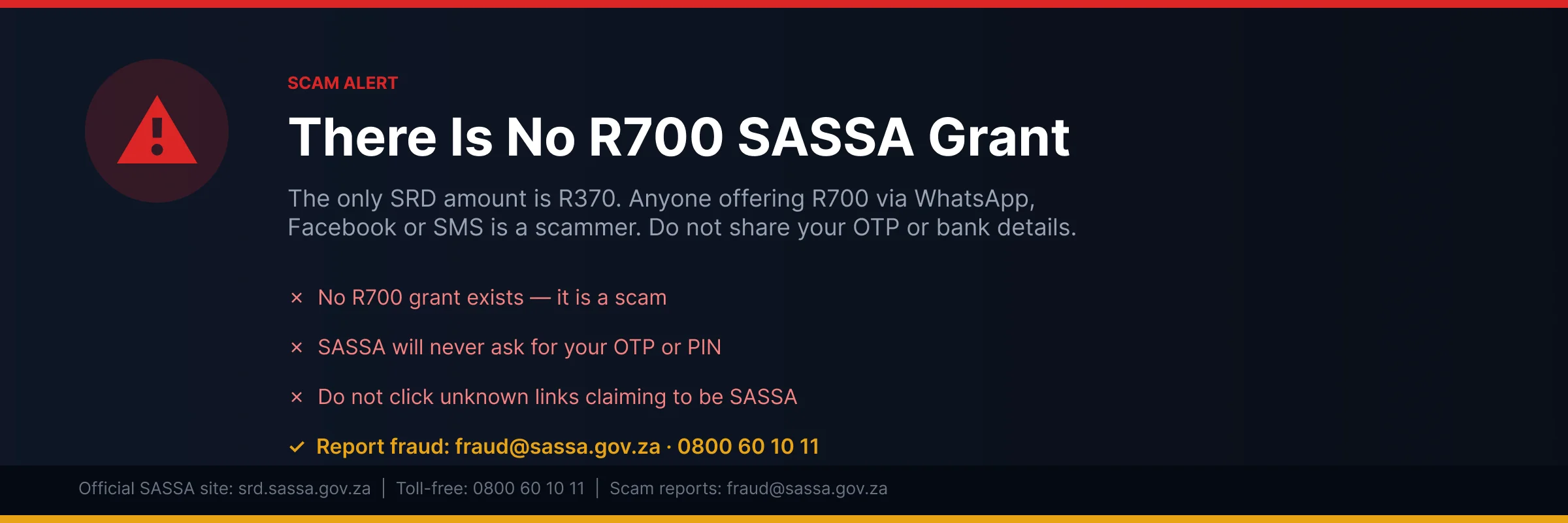
Criminals target SASSA grant holders. They use fake websites, fake SMS messages, and SIM swaps to steal your money. Here is how to stay safe.
SASSA Will Never Ask for Your OTP or PIN
SASSA and its banking partners will never ask for:
- Your banking PIN
- Your OTP (one-time PIN)
- Any payment to "unlock" or "speed up" your grant
- Your password
If anyone asks for these, it is a scam. It does not matter how official they sound. Hang up right away. Then call SASSA on 0800 60 10 11 to report it.
Only Use Official SASSA Websites
There are only two safe SASSA websites:
- srd.sassa.gov.za - for the SRD R370 grant
- sassa.gov.za - the main SASSA site
Any other website that looks like SASSA but has a different web address is a fake SASSA website. Scammers build these sites to steal your ID number and phone number. Do not enter your details on unofficial sites.
Always type the web address yourself. Never click links in WhatsApp or SMS messages from strangers. Even if the message looks real, the link can send you to a fake site.
The R700 SASSA Grant Does Not Exist
You may see posts on Facebook or WhatsApp about a new R700 SASSA grant. These posts are false. There is no R700 grant. The SRD grant is R370.
Anyone asking you to fill in a form or pay money to get a "higher" grant is running a scam. Do not share the post. Report it to SASSA by emailing Fraud@sassa.gov.za.
Protect Against SIM Swap Fraud
SASSA SIM swap fraud works like this. A criminal gets a copy of your SIM card from your network. They take control of your phone number. Then they receive your SASSA OTPs and redirect your grant payments to their account.
The main warning sign is simple. Your phone suddenly loses all signal, even in areas where you always have signal.
If this happens to you:
- Call your network (Vodacom, MTN, Cell C or Telkom) right away and ask them to block your number.
- Call SASSA on 0800 60 10 11 and ask them to freeze your profile.
Report SASSA Fraud
If you are a victim of a SASSA scam, report it fast:
- Fraud hotline: 0800 60 10 11 (free call)
- Email: Fraud@sassa.gov.za
- Police: Open a case at your nearest SAPS station
Quick reporting gives you the best chance of stopping the criminal and saving your grant money.
SASSA SRD Status Check 2026: Latest Updates
The SRD grant pays R370 a month in 2026. The means test limit stays at R628 a month. If money over R628 comes into your account, SASSA can decline you for that month. You can check your status any time at srd.sassa.gov.za using your ID number and phone number.
SASSA Status Check August 2026
SASSA is busy processing August 2026 payments now. Log in at srd.sassa.gov.za and look at the August line on your status page. If it says "approved", your pay date shows next to it. Most August payments land near the end of the month. Keep your phone on so you get the SMS.
SASSA Status Check September 2026
September statuses are not up yet. SASSA loads new statuses in the first week of each month. So check srd.sassa.gov.za again around 3 to 7 September. Your September result does not depend on August. You can be approved one month and declined the next if your bank balance changes.
SASSA Status Check October 2026
October works the same way. Wait for the first week of October, then check srd.sassa.gov.za. Do not panic if your status still shows September. It just means SASSA has not finished the October run yet. Check again after a few days.
SASSA Status Check November 2026
Check your November status from the start of November at srd.sassa.gov.za. Payment dates usually fall in the last week of the month. If your status says "pending", give SASSA a bit more time before you phone them or visit an office.
SASSA Status Check December 2026
December is the last payment month of 2026. SASSA sometimes pays a few days earlier in December because of the public holidays. Check srd.sassa.gov.za in the first week of December so you know your date. Banks and post offices get very busy in December. Draw your money on a quiet day if you can.
SRD R370 Grant Changes in 2026
- Grant amount: R370 per month. It went up from R350.
- Means test: You must earn less than R628 a month.
- Applications: Online only at srd.sassa.gov.za. No paper forms at offices.
- Income checks: SASSA looks at your bank account every single month.
That last point catches many people. If a friend sends you R700 for something, SASSA can count it as income. Then your status shows declined for that month.
SASSA SRD Eligibility in 2026
- You must be between 18 and 59 years old.
- You must be a South African citizen or permanent resident.
- Your income must be under R628 a month.
- You must not get any other SASSA grant.
- You must not be registered for UIF.
- You need a working South African cellphone number in your name.
Asylum seekers and special permit holders with valid papers can also apply. Your cellphone number matters a lot. SASSA sends your OTP and payment SMS to that number, so keep it active.
SASSA Contact Details: How to Reach SASSA
Sometimes the website cannot answer your question. Then you need to speak to a real person at SASSA. Here are all the ways to reach them.
SASSA Toll-Free Number: 0800 60 10 11
This number is free to call. It works from a landline or a cellphone. You will not pay airtime.
The call centre is open Monday to Friday, 8am to 4pm. They are closed on weekends and public holidays.
Have your ID number ready before you call. The agent will ask for it first. Then tell them clearly what you need. It could be a status check, a banking details update, or help with an appeal.
SASSA WhatsApp: 082 601 0111
Save this number on your phone. WhatsApp is open 24 hours a day, 7 days a week.
Use it to check your status, check your payment, or ask about your banking details. Send "Hi" to start the chat. Then follow the menu options.
WhatsApp is often faster than calling. The phone lines get very busy around payment dates.
Find Your Nearest SASSA Office
Go to sassa.gov.za to find the office closest to you. You can also call 0800 60 10 11 and ask them.
Bring your green ID book or your smart ID card. Also bring the phone number you used on your application. Without these, staff cannot help you.
Tip: Avoid Monday mornings. Offices are packed at the start of the week. Try a Wednesday or Thursday afternoon instead.
SASSA Online Query
You can also log a query without leaving home. Log in to srd.sassa.gov.za with your ID and phone number.
Look for the "Contact Us" or "Log a Query" section. Type your question or complaint there.
SASSA will give you a reference number. Write it down and keep it safe. You will need it when you follow up.
All SASSA Contact Numbers, Emails and Offices
Here are all the ways to contact SASSA. Always have your ID number ready before you reach out.
SASSA Toll-Free Number - 0800 60 10 11
This is the main SASSA toll-free number. Calls are free from any South African phone. This includes mobile phones and landlines.
The call centre is open Monday to Friday, 8am to 4pm. Call this number for:
- Status queries
- Banking detail updates
- Declined status questions
- Fraud reports
Avoid Monday mornings. Lines are busiest then. The best time to call is Tuesday to Thursday, between 9am and 3pm.
SASSA Head Office Switchboard - 012 400 2322
Use this number for policy questions. It also helps when the toll-free line is busy. The switchboard works during weekday business hours only.
SASSA WhatsApp - 082 601 0111
The SASSA WhatsApp line is open 24 hours, 7 days a week. Send "Status" or "Hi" to start a chat. Use WhatsApp for:
- Status checks
- Banking questions
- Payment queries
Warning: Never share your PIN or OTP over WhatsApp. SASSA will never ask for them.
SASSA Email Addresses
SASSA has different email addresses for different queries. Use the right one to get a faster reply.
| Query Type | Email Address |
|---|---|
| General grant queries | Grantsenquiries@sassa.gov.za |
| SRD grant only | SRD@sassa.gov.za |
| Fraud reports | Fraud@sassa.gov.za |
Always include your ID number, your application reference, and the month you are asking about. This helps SASSA find your record faster.
SASSA Head Office Address
You can visit or write to the SASSA head office in Pretoria:
SASSA House, 501 Prodinsa Building
Corner Steve Biko and Pretorius Streets
Pretoria, 0083
Postal address: Private Bag X55662, Arcadia, 0007
Find Your Nearest SASSA Office
Go to sassa.gov.za to find the office closest to you. When you visit, bring:
- Your green ID book or smart ID card
- The phone number linked to your application
Avoid Monday mornings at local offices. Queues are longest then. Try a Wednesday or Thursday afternoon instead.
SASSA Online Query
You can also log a query online. Go to srd.sassa.gov.za and click "Contact Us" or "Log a Query". Submit your question there. SASSA will give you a reference number. Keep this number safe. You will need it to follow up on your query.
Do I Need to Reapply for SRD Every Month?
No. You do not need to reapply for SRD every month. Once your application is active, SASSA checks your details again each month. This happens automatically. You do not need to do anything.
SASSA runs fresh checks every month. It uses data from banks, Home Affairs, UIF and SARS. If you still qualify, your grant gets approved for that month. Your status updates on its own.
You only need to send a new SASSA reapplication if:
- Your application lapsed
- SASSA cancelled your application
- Your status shows "Application Not Found"
- Your status shows "Reapplication Required"
If your application is active, do not reapply. A new application can cause delays. Just check your status once a month. This tells you if SASSA approved or declined your grant for that month.
SRD R370 Grant - What Happens Next?
The SRD R370 grant is funded until 31 March 2027. Government set aside R36.4 billion for this cycle. Payments will continue as normal every month until then. If you get the grant now, nothing changes for you yet. Keep applying and keep checking your status.
What Changes in 2027?
Government plans to replace the SRD with a new grant called the Livelihoods Support Grant. This new grant will work differently. It will be linked to skills training and job-seeking activities. This means you may need to show that you are looking for work or learning new skills to qualify. The new grant will also be more targeted than the current SRD. Not everyone who gets the SRD now will automatically qualify for the new grant.
Is the SRD Grant Permanent?
Not yet. Treasury has put money aside for 2027/28 and 2028/29, but this is not confirmed. It could still change. President Ramaphosa will share more details at the Medium Term Budget Policy Statement (MTBPS) in October 2026. That announcement should tell us more about the SRD grant extension for 2027 and how the new Livelihoods Grant will work. Until then, no one can promise the grant will become permanent.
What Should You Do Now?
Do not panic and do not stop applying. Here is what you should do:
- Keep your SRD application active every month
- Update your phone number and banking details on the SASSA website
- Check your status every month, even if you were approved before
- Ignore rumours - payments continue until SASSA officially changes the system
The grant is safe until March 2027. Stay updated through official SASSA channels and keep your details correct so you never miss a payment.
SASSA Status Check FAQs
How do I check my SASSA SRD R370 status?
Go to srd.sassa.gov.za on your phone or computer. Click on "SRD R370 Application Status". Enter your South African ID number and the cellphone number you used to apply. Click "Submit". Your status for each month will show on the screen within a few seconds.
What does "pending" mean on my SASSA status?
Pending means SASSA is still checking your application. They check your income, bank records and other government databases. This can take a few days or a few weeks. You do not need to do anything. Just check your status again after a week or two.
What does "approved" mean on SASSA status?
Approved means SASSA accepted your application for that month. You passed the means test and all checks. Approved is the decision, not the payment. Look at the pay day field under your approved status. SASSA says that if no pay day value is provided, no payment has been processed yet. Check again later in the month.
How do I check my SASSA status using my ID number?
You only need two things: your 13-digit ID number and your registered cellphone number. Visit srd.sassa.gov.za, type in both numbers, and click "Submit". The site shows your status for every month. Make sure you use the same phone number you gave SASSA when you applied.
What is the SASSA SRD R370 payment date for 2026?
SASSA pays SRD grants between the 24th and the end of each month in 2026. Your exact date depends on when SASSA approves you. Each person gets their own payment date. Check your date on srd.sassa.gov.za. Money can take two to three days to reach your bank.
How do I check my SASSA status on WhatsApp?
Save the SASSA WhatsApp number 082 601 0111 on your phone. Send the word "Status" to that number. Follow the steps in the chat. You will need your ID number and phone number. WhatsApp replies with your grant status. It works well when the website is slow.
What is the SC19 SASSA status check?
SC19 is SASSA's internal reference code for the Social Relief of Distress grant. The SC19 portal at srd.sassa.gov.za/sc19 is where you apply, check your status, appeal, and update your details for the R370 grant. Always use srd.sassa.gov.za — not the broader sassa.gov.za — for SRD grant matters.
Why does my SASSA status show approved but no payment date?
SASSA approves grants first, then adds payment dates later. Your bank details may also still be under review. If your banking details show "pending", the payment waits until they clear. Check again after a few days. Most dates appear before the end of the month.
How do I check my SASSA balance?
Dial *120*3210# or *120*69277# on your phone and follow the steps. You can also check at an ATM if you have a SASSA card. Postbank card holders can check at retail stores like Pick n Pay or Boxer. The USSD check is free on all networks.
What is the USSD code for SASSA status check?
Dial *134*7737# on the phone number you used to apply. Follow the menu and enter your ID number. Your status comes back by SMS. This code works on any phone, even without airtime or data. It is the easiest option for basic phones.
How long does SASSA SRD approval take?
SASSA does not publish a turnaround time. Its status guide only says to check again later in the month, so any fixed number of days you read elsewhere is a guess. SASSA checks your details with banks, SARS, UIF and other databases every month. If your status is still pending after the next payment cycle, call SASSA on 0800 60 10 11 for help.
What does "declined" mean on SASSA status?
Declined means SASSA rejected your application for that month. The status shows a reason, like income found in your bank account or a UIF payment. If you think the decision is wrong, you can appeal. Submit your appeal at srd.dsd.gov.za within 90 days of the rejection, and lodge a separate one for every month you were declined.
Can I check my SASSA status without internet?
Yes. Dial *134*7737# on your phone. It works with no data and no airtime. You can also call the toll-free line on 0800 60 10 11. Both options give you the same official status as the website. USSD is best for basic phones.
What is the SRD R370 grant amount in 2026?
The SRD grant pays R370 per month in 2026. It started at R350 in 2020 and went up to R370 in April 2024. The government reviews the amount each year in the budget speech. Any increase would start in April, at the start of the new financial year.
How do I check my SASSA R350 status online?
The R350 grant is now the R370 grant. The check works the same way. Go to srd.sassa.gov.za, enter your ID number and cellphone number, and click "Submit". Your monthly status will load on the screen. Old R350 payment history also shows on the same page.
What happens after SASSA status shows "approved"?
SASSA sets a payment date for you. The money then goes to your bank account, your Postbank card, or a cash pickup point. Bank payments take two to three working days to clear. Keep checking your status page. Your payment date appears next to the approved month.
How do I check my SASSA banking details status?
Log in at srd.sassa.gov.za with your ID and phone number. Your banking status shows with your grant status. If it says "verified", your money goes to that account. If it says "pending", wait a few days. You can also update your bank details on the same site.
What is the SASSA payment date for August 2026?
SRD payments for August 2026 run from about 25 August to the end of the month. Your exact date shows on srd.sassa.gov.za once SASSA approves you. Older grants like pensions pay earlier, from the first week of the month. Dates can shift on weekends.
Why is my SASSA status check not showing anything?
The website may be overloaded, especially near payment dates. Try again later or use WhatsApp on 082 601 0111. Also check your details. A wrong ID number or wrong phone number gives no result. Use the exact cellphone number you registered with SASSA.
How do I fix "banking details pending" on my SASSA status?
Go to srd.sassa.gov.za and click "How do I change my banking details". Enter your ID number. SASSA sends an SMS with a secure link to your registered phone. Open the link and add your correct bank details. The account must be in your own name.
What is the SASSA WhatsApp number?
The official SASSA WhatsApp number is 082 601 0111. Save it and send "Hi" or "Status" to start. You can check your status, ask questions and get help with your application. It is free apart from normal data costs. Do not trust other WhatsApp numbers.
What is the SASSA toll-free number?
Call SASSA free on 0800 60 10 11. Lines are open Monday to Friday during office hours. Have your ID number ready before you call. An agent can check your status, explain a declined reason and help with banking problems. The call costs nothing on all networks.
How do I check SASSA status on the Moya or Umoya app?
Download the Moya app from your app store. It is data-free on most South African networks. Open the app, find SASSA under the Discovery section, and enter your ID and phone number. Your status loads inside the app. This is a good option if data is a problem.
What does "cancelled" mean on SASSA status?
Cancelled means the application was stopped. You may have cancelled it yourself, or someone did it with your details. If you did not cancel, reinstate it fast. Go to srd.sassa.gov.za, click "Reinstate my cancelled application", and follow the steps with your ID number.
How do I use the SC19 portal to check my SASSA status?
Open the SASSA services portal through sassa.gov.za. Choose the status check option and enter your ID number and phone number. Your grant details will show. For SRD R370 checks, srd.sassa.gov.za is quicker and built just for that grant. Both are free official sites.
What is the means test for SRD R370?
The means test checks money coming into your bank account. If you get more than R628 in a month, SASSA declines you for that month. SASSA runs this test every single month. Income includes salaries, UIF, NSFAS and other grants, but not small gifts from family.
What does "failed" mean on SASSA status?
Failed usually means your identity check did not pass. Your name, ID number or phone number may not match Home Affairs records. Check that you typed everything correctly. If your details are right, call 0800 60 10 11 or visit a SASSA office to fix the problem.
Can I check my SASSA status on a basic phone?
Yes. Dial *134*7737# on any phone, even an old Nokia. No data or airtime is needed. Enter your ID number when asked. Your status arrives by SMS. You can also call 0800 60 10 11 for free and ask an agent to check for you.
How do I re-apply for the SRD grant after being declined?
You do not always need to re-apply. SASSA checks your details again every month. If you were declined unfairly, appeal at srd.dsd.gov.za within 90 days of the rejection. Lodge one appeal per declined month and give your reason. The appeal decision takes 60 to 90 days.
What does "referred SAFPS" mean on my SASSA status?
SAFPS is the South African Fraud Prevention Service. This status means your ID may be linked to fraud, often through identity theft. Contact SAFPS on 011 867 2234 or at www.safps.org.za to clear your name. Once cleared, ask SASSA to review your application again.
How do I check my SASSA SRD R370 appeal status?
Go to srd.dsd.gov.za and open the appeal section. Enter your ID number and the phone number you applied with. Pick the month you appealed. The screen shows that month as pending, approved or declined. An independent tribunal decides appeals, not SASSA, so it can take 60 to 90 days. If your appeal is approved, SASSA pays the back money for those months.
About This SASSA Status Check Tool
This SASSA status check tool is independent. SASSA does not run it. The South African government does not run it either. We built it to make checking your grant status quick and easy. But we cannot approve your application. We cannot decline it. We cannot change any details on your file. Only SASSA can do those things. If you need official help, go to srd.sassa.gov.za. You can also call the SASSA toll-free line on 0800 60 10 11. That line is free from most South African networks. For payment problems, appeals or wrong information on your application, always speak to SASSA directly. This site gives you independent SASSA information to help you understand your status. It does not replace official SASSA channels.
We take your privacy seriously and follow POPIA rules. We do not store your ID number. We do not save your phone number. We do not keep any of your personal information. When you type your details in, we use them once. We send them to fetch your status, then show you the result. After that, nothing stays on our system. Your information is never sold or shared with anyone.